 E-commerce
Starting an Ecommerce Business: Orders, Delivery and Cash Flow
Connect ecommerce orders, stock, delivery, COD payments and customer care. A practical story with AI chat, Social Hub and room to grow into ERP.
Anichur Rahamanvor 1 Tag12min

Plan a limited ERP rollout with clear data owners, reconciled balances, tested workflows and cutover gates. A 90-day example, not a delivery guarantee.
Autor
Anichur Rahaman

It is Friday afternoon. The shop says an item is available; the warehouse sheet says it is not. A customer is waiting while two colleagues compare exports. This is an illustrative scene, not a customer case study. The problem is familiar: several tools each hold a different version of the same fact.
Adding another dashboard will not settle the disagreement. The team needs to decide who owns each record, how changes reach other systems, and what happens when a message arrives late. That is the practical purpose of an ERP: a business process people can trust, not merely more screens.
This 2026 planning guide shows how to organise a first, limited ERP rollout over roughly 90 days. It is a planning example, not a delivery promise. Multiple legal entities, complex manufacturing, regulated data or country-specific payroll can require a longer programme.
The licence fees for five separate tools are rarely the problem. The problem is the work that happens between them. It is invisible on any invoice, so it is easy to underestimate. Here is what it usually looks like:
Measure the coordination work before buying. For example, four people spending 30 minutes a day reconciling exports across 20 working days use 40 staff-hours a month: 4 × 0.5 × 20. This is illustrative arithmetic, not an industry benchmark or a promise that automation will remove all 40 hours.
You do not need an ERP because you reached a certain revenue. You need one when the cost of coordination is higher than the cost of change. These are the signs I look for:
These signs justify an investigation, not an automatic purchase. One serious control failure may matter more than several minor inconveniences. Compare a targeted integration or a better process with replacing the whole system.
A shared login is useful, but integration needs an agreed owner for each business fact. Inventory owns stock movements; accounting owns posted journals. Other modules may keep controlled read models, but they must not silently become competing masters.
Events are one integration approach, not a guarantee of correctness. Design retries, duplicate detection, reconciliation and visible failure handling. An audit trail also needs deliberate identity, timestamp, retention and access controls; an event bus alone does not provide them.
Follow a single sale through an integrated system and the value becomes obvious:
| Business checkpoint | Evidence to retain |
|---|---|
| Order accepted | Validate the order and applicable commercial rules. |
| Stock reserved | Hold available quantity; release it when the order is cancelled or the reservation expires. |
| Payment recorded | Keep authorised, captured, failed, refunded and unpaid states distinct. |
| Fulfilment confirmed | Record what shipped, what was delivered and what came back. |
| Accounting posted | Apply finance-approved recognition, tax and receivable rules. |
| Settlement reconciled | Match the payment or courier remittance to its orders, fees and adjustments. |
The table is a business checklist, not a universal posting sequence. People still resolve payment exceptions, approve refunds and investigate stock differences. Order acceptance, delivery, revenue recognition and cash settlement are distinct events; finance must approve the applicable accounting rules.
A single cutover can be appropriate for a tightly connected scope, but it concentrates risk. A phased rollout reduces the initial blast radius while introducing temporary integration and reconciliation work. Choose the method according to dependencies and the team’s ability to support it.
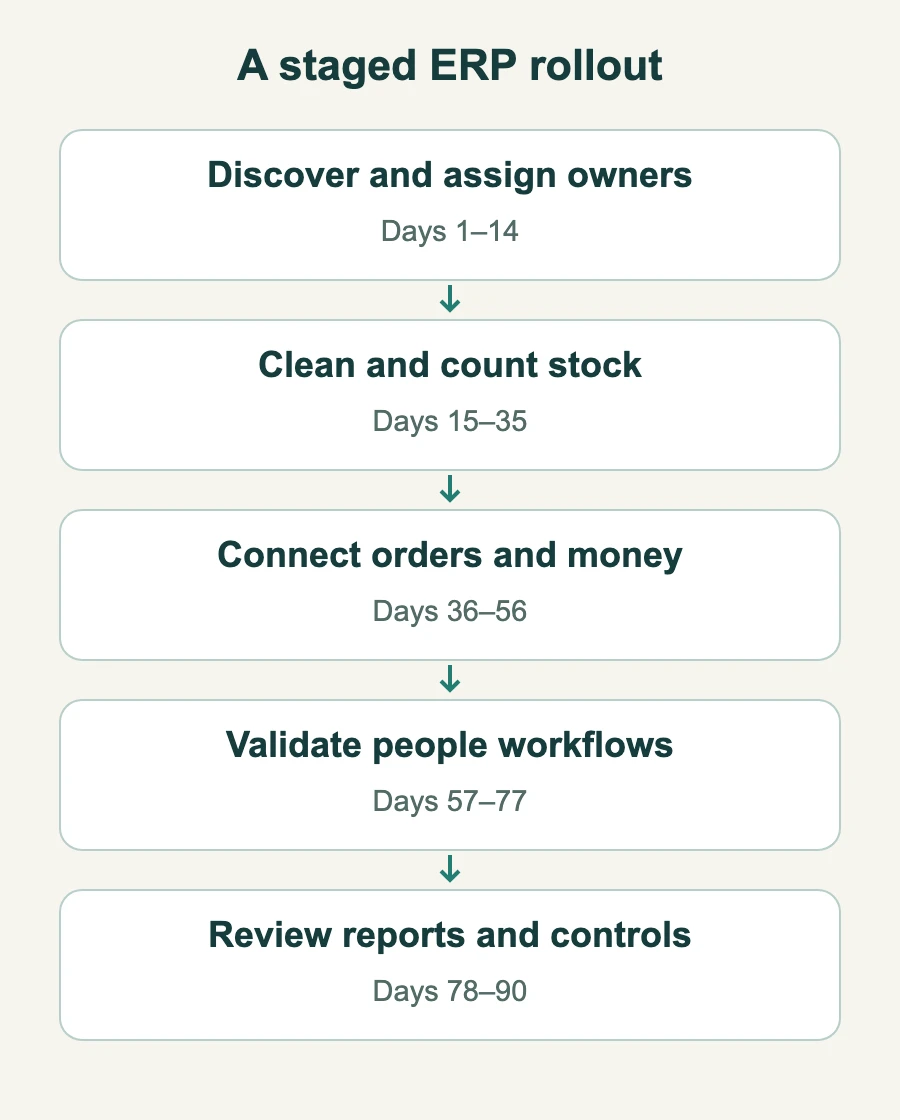
Use the following phases as planning windows. Start with one location or one end-to-end process. Move the next boundary only when agreed evidence is ready; a date on the calendar is not an acceptance test.
Before you configure anything, list every tool, who owns it and what data it holds. Then decide the master record for each kind of data: products, customers, suppliers, employees. Clean the obvious problems now: duplicate customers, SKUs that mean two different products, suppliers spelled three ways.
Outcome: a one-page migration map that says where every important number will live after the move.
Load products, variants and barcodes. Set up your locations: warehouse, outlets, and anything in transit. Enter opening stock with its cost, because cost is what makes your margin reports meaningful later. Run a physical count at the end of the phase and compare it with the system.
Outcome: one stock count that every channel reads from.
Test orders, payments, refunds, taxes and settlements end to end. Finance should approve opening balances and posting mappings. During a comparison run, name one official ledger and reconcile the second system against it; avoid two uncontrolled sources of truth.
Outcome: books that close from the system, not from spreadsheets.
Add payroll only when local rules, privacy controls and ownership are ready. Compare a complete pay cycle, including leave, overtime, deductions, corrections and the resulting journal. If payroll needs more time, keep its controlled integration rather than forcing it into day 90.
Outcome: payroll in one run, linked to attendance and leave.
Now that the data is trustworthy, decide which numbers each role should see every morning. Schedule a low-stock digest, a daily sales summary by channel and outlet, and an approval flow for refunds and purchase orders. If you use an AI assistant, start it in read-only mode and let it act only after a person approves.
Outcome: decisions made from data everyone trusts.
Phase gate: the process owner signs off reconciled data, realistic exception tests, trained operators and a support plan. A quiet week helps reveal problems, but it cannot replace testing a month-end close, a refund or another less frequent critical event.
Rehearse an order, a partial delivery, a return and a failed settlement with the people who do the work. Test a repeated webhook and a provider outage. Define who can retry, approve an adjustment and see salary or customer data. Specify the cutover freeze, final data export, reconciliation totals, decision owner and rollback trigger. If the new system has already accepted transactions, returning to the old system requires a controlled reconciliation of those new records; restoring an old backup alone is not a safe rollback.
This short tour shows the accounting side of the loop described above: the chart of accounts, journal entries created by business events, and reports built from them.
Choose migration scope with the business and its retention obligations in mind. Reconcile opening quantities, values and balances; retain searchable history where needed. Do not discard records simply because they are old. Validate a restore before depending on the backup.
Try the standard workflow before customising it, while documenting genuine legal, safety or operational gaps. Prioritise changes with an owner and a measurable benefit. There is no reliable rule that most requirements disappear after a month.
Every module needs one person inside the business who decides how it is used: one for inventory, one for accounting, one for HR. Without owners, configuration decisions are made by whoever shouts loudest.
Managers get the demo; cashiers and pickers get a printed sheet. Then the counter staff create workarounds that break stock accuracy. Train the people who touch the system most, on their own screens.
Go-live is the start of the useful part. Plan a 30-day stabilisation period with a daily 15-minute check-in, a shared list of issues and a clear owner for each one.
Record a baseline and agree targets with the people who own each process. The worksheet below defines what to measure; it does not present invented before-and-after benchmarks.
| Measure | Definition |
|---|---|
| Close duration | Working days to finance sign-off; explain unresolved items. |
| Count-line accuracy | Correct SKU-location count lines ÷ checked lines × 100. |
| Overselling | Accepted orders that cannot be fulfilled because sellable stock was wrong. |
| Reconciliation effort | Staff-hours spent moving and checking the same data. |
| Unmatched settlement | Unexplained amount and age, including fees, refunds and partial payments. |
Example: 196 correct SKU-location counts out of 200 checked equals 98% count-line accuracy. That does not mean 98% accuracy by stock value. Use the same sample method, units and reporting window when comparing periods.
Use the StoreConsole demo to test a real workflow, not just a feature list. Check the modules, permissions, supported integrations, hosting and recovery responsibilities that your business actually needs. Confirm those requirements before agreeing scope or a launch date.
Microsoft’s implementation guidance supports rehearsed migration and business sign-off. The timetable and worked examples here are editorial planning examples, not Microsoft requirements. Reviewed 4 November 2026.
Anichur Rahaman is a software architect and the creator of StoreConsole. He designs commerce and ERP systems for growing businesses, with a focus on event-driven architecture, data integrity and self-hosted operations.
Über den Autor
Anichur Rahaman
Weiterlesen