Starting an Ecommerce Business: Orders, Delivery and Cash Flow
Connect ecommerce orders, stock, delivery, COD payments and customer care. A practical story with AI chat, Social Hub and room to grow into ERP.
Author
Anichur Rahaman
8 hours ago12 min read4 views
It is nearly midnight when Arif gets the message: “Has my parcel actually left?” He remembers taking the order. He remembers someone packing a box. The courier dashboard, a spreadsheet and the conversation on his phone each tell a slightly different story.
A week earlier, his first online orders felt like proof that the business could work. Now his bottle-and-lunchbox shop has a different problem: the work behind a sale is growing faster than his way of keeping track of it.
Arif and the numbers below are fictional. The scenario illustrates everyday operating decisions, not a customer testimonial or a promise of results.
If you are starting an ecommerce business, you do not need a complicated organisation chart on day one. You need a dependable answer to five questions: what was ordered, what is available, who is delivering it, where the money is, and who owns the next step.
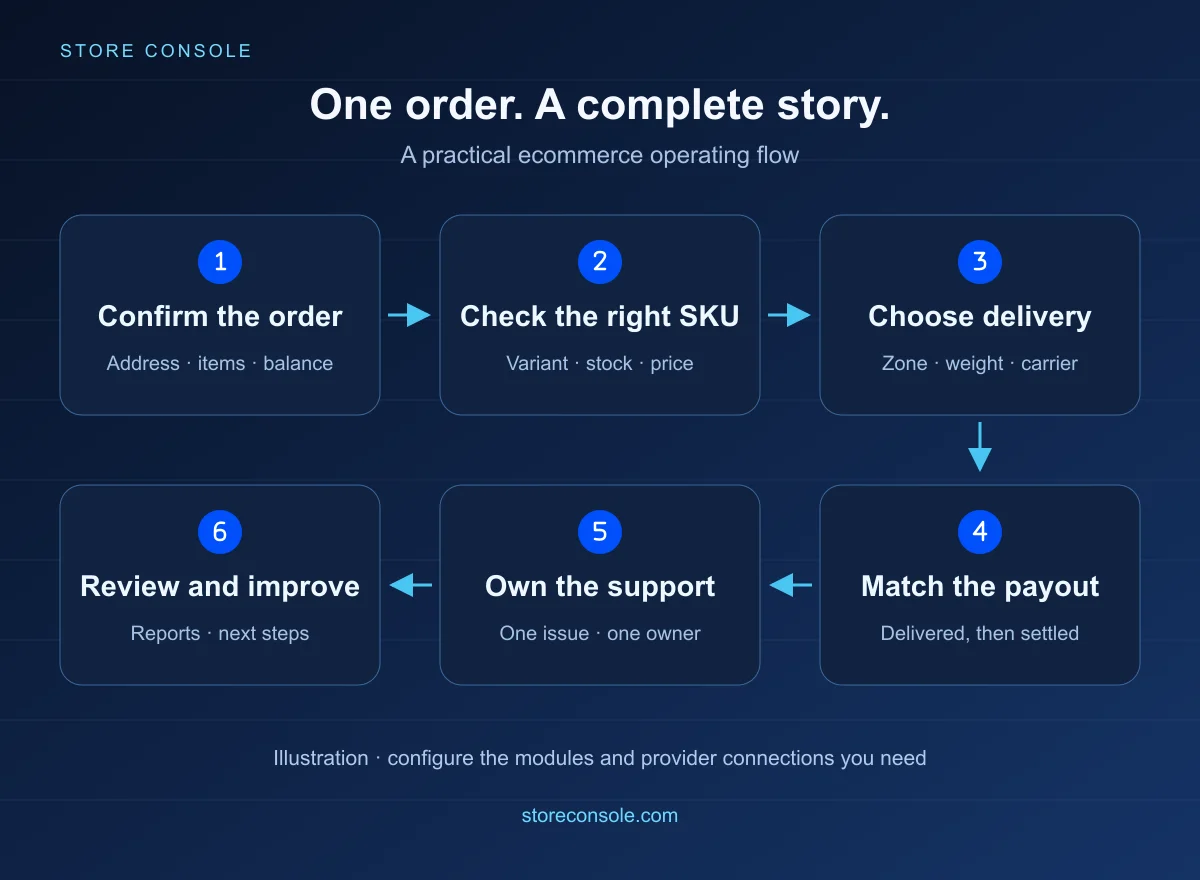
One order, followed through the business. Illustration; the steps depend on the modules and integrations you configure.
1. Give each order one record to follow
Arif's first improvement is ordinary: stop treating a screenshot as the order record. Put the customer, address, exact items, amount paid, balance due and current status against the same order number. A colleague should be able to continue the work without asking the owner to search a chat.
In Store Console, the order view connects payment and fulfilment information. A recorded advance reduces the remaining balance; courier COD should be based on that balance, not on an old screenshot of the original total. If a payment was entered incorrectly, use the supported correction or void flow with a reason instead of hiding the mistake in a note.
Start with a useful filter: orders waiting for confirmation, orders ready to dispatch, or orders with a balance due. A list is helpful when it tells the team what to do next.
2. Make the product easy to buy and hard to pick incorrectly
A blue 500 ml bottle and a black 1 litre bottle are not interchangeable stock. Give each sellable variant its own SKU, photo, price and stock record. Product attributes can also become useful filters, so the customer can find the size or colour they meant to buy.
Store Console Catalog supports variants, filterable attributes, categories and product bundles. Keep names consistent with packing labels and reports. Before a promotion, check the actual stock for the advertised variant, not just the total across the product family.
Page Builder helps you arrange the storefront around a clear buying journey: what the product does, which option to choose, what delivery will cost and how to get help. Edit the supported blocks, preview on a phone, and publish when the layout makes sense. More blocks do not automatically make a better product page.
3. Own rider or courier? Price the actual delivery
Arif can deliver nearby orders with his own rider. A parcel going farther away needs a courier. A heavier carton has different economics from a single bottle. One delivery charge pasted across the whole store stops being useful surprisingly quickly.
Store Console Delivery separates the destination, zone, method and rate rule. Your location tree can represent country, state or division, district or city, and smaller areas. Methods can use your own fleet, a configured courier or a manual carrier.
Illustrative delivery cases, not carrier prices
Order
Decision to configure
Check before launch
Nearby, light parcel
Own-rider method and its zone/rate
Coverage and a real delivery promise
Another district, heavier carton
Courier method with billable-weight rules
Weight brackets, COD and return costs
Special handling or uncovered area
Eligible shipping class or a deliberate fallback
No accidental free or unavailable delivery
A rate can combine configured components such as a base amount, additional weight, distance or COD percentage. Within a method, the first rule whose conditions match wins; separate rules are not all added together. Put specific cases before a general catch-all. Test addresses and weights on both sides of each boundary.
The amount charged to the customer and the carrier's actual cost are different records. A delivery discount is a cost the business is choosing to absorb. Courier accounts, credentials, supported services and any live-quote capability must be configured; choosing a country does not create a carrier contract.
4. Use risk signals and tracking to ask better questions
A returned parcel is not proof of a dishonest customer. An incomplete address can belong to a genuine buyer. Review the order, confirm unusual details and consider available delivery history before deciding how to proceed.
Store Console can show supported courier-history signals and merchant-set risk thresholds where the relevant provider is connected. These support a human decision; they do not certify that every order is real or block every fraudulent attempt.
After dispatch, share the customer-facing tracking link. Supported couriers send updates through webhooks or scheduled checks; your own-fleet workflow has its own delivery updates and proof options. If a status looks stuck, check when the provider last reported. A delayed update is not the same as a stopped parcel.
5. Delivered is a milestone. Settled is another
One evening, Arif sees twelve delivered orders. The courier has settled eight of them. Four are still awaiting payout. Buying tomorrow's stock as if all twelve payouts had reached the bank would make the business look healthier than its cash position.
A fictional daily check
Record
Count
Next action
Delivered orders
12
Confirm delivery and return records
Settled courier payouts
8
Match references, fees and receipts
Delivered, payout outstanding
4
Follow expected settlement dates
Accounting keeps the transaction record; Finance helps you plan the timing of money coming in and going out. Store Console provides connected accounting flows, expense records, reports, budgets and cash-flow tools through the relevant modules. Configure accounts and posting rules with the person responsible for your books, then reconcile the records.
Sales, available cash and profit answer different questions. Include product cost, delivery subsidies, payment fees, advertising, returns and overhead in the appropriate records. A dashboard cannot recover a cost that nobody recorded.
6. Make offers useful, and rewards understandable
Arif's lunchbox-and-bottle bundle gives a customer a simple choice. A quantity tier can make a bulk purchase clearer: different unit prices for 1–9, 10–49 and 50 or more units, for example. Store Console supports bundles and quantity-based pricing; define which items qualify and check the final basket price. These are illustrative brackets, not a published offer.
Before discounting, check the margin left after fulfilment and returns. A larger order is only helpful if you can supply it and the pricing still works.
Loyalty: define what earns points, what they can buy and when they expire.
Wallet: keep store credit and its transaction history clear. Credit owed to a customer is not new sales income; refund choices should follow your agreed policy.
Affiliate: define attribution, commission approval and the handling of cancelled or refunded orders before recruiting partners. A pending commission is not a completed payout.
Use these modules when they solve a repeat-purchase or referral problem. You can start without launching every incentive at once.
7. Turn “please check my inbox” into a support process
A customer asks for a replacement lid. The sales colleague assumes packing will handle it; packing assumes the owner has replied. This is how a small problem becomes a public complaint.
With the Support module, a ticket can carry the conversation, an assignee, priority and status. Saved replies and a knowledge base help the team explain delivery, returns and product use consistently. Internal notes keep staff discussion separate from the customer-facing reply.
Give the issue one owner. Record what was promised and when the next update is due. Closing a ticket should mean the problem has been handled, not merely that someone sent a message.
8. Keep social sales moving without living in the inbox
While Arif is packing, someone asks “price?” under a Facebook post. Another buyer sends the bottle photo on WhatsApp. These are buying conversations, but each still needs the right product, a clear answer and someone responsible when the question gets complicated.
Social Hub brings the connected social work together. In Inbox & AI agent, choose team-only replies, AI with a configured chance for the team to answer first, or AI after hours. The customer-facing AI can use supported catalog tools for product questions and order tracking. Chat ordering also needs the relevant Checkout AI setting enabled. If it cannot confidently identify the product, or the customer asks for a person, hand the conversation to the team rather than inventing a price or promise.
WhatsApp, Facebook Messenger and Instagram: connect the supported business accounts, set greetings and team hours, and enable only the follow-ups you want. A complaint or refund dispute still needs a responsible person.
Automation Studio: turn a comment or message into a defined next step, such as a product-link reply or a team task. AI can help draft the flow. Simulate it before enabling it, then inspect Runs; AI-built drafts go through approval. Keep private customer details out of public comment replies.
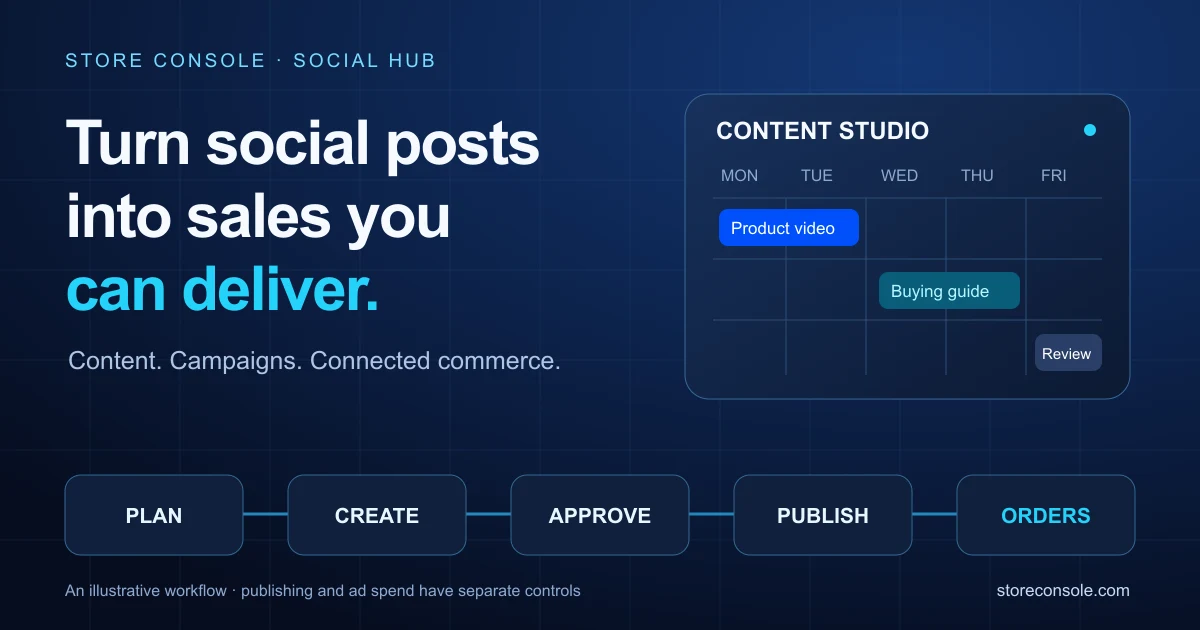
Content Studio: draft captions with AI, review the offer and schedule supported posts for connected Facebook, Instagram, TikTok, YouTube, X or LinkedIn accounts. AI and recipe drafts need approval. When Core Calendar is available, the shared studio brings Social, Blog and Product publication into one view, with each module's permissions.
For ads, Social Hub can help plan a Meta campaign from a product. Review the audience, creative and daily budget in the approval workflow; a newly created campaign starts paused, and you decide when to activate it. This is not a promise that every network supports campaign creation or that AI automatically spends your budget. Measure the resulting orders and costs alongside the delivery and cash-flow story above.
Start with one connected channel and one tested automation. You need the relevant modules, Meta permissions and any required App Review, working channel/webhook connections, and a configured AI provider and budget. WhatsApp consent, opt-outs, reply windows and approved-template requirements still apply; automation does not remove provider charges or platform rules. Keep human handoff available. For a closer walkthrough, see social media sales, scheduling and practical AI prompts.
9. Add ERP depth when the work actually needs it
At the beginning, Arif needs a usable shop and a reliable order-to-delivery routine. As the team grows, a rota in a chat and salary calculations in separate files become harder to manage.
That is where HRM can hold employee records, attendance and leave; Payroll can manage pay periods, adjustments, approvals and payslips; and Momentum can give internal work an owner, status and board. Finance and Accounting add the controls and reporting the business needs as it becomes more complex.
Store Console is an ERP-capable platform, but your first ecommerce setup does not need every module. Choose the modules and their required dependencies for the work you have now. Check the current configurator for inclusion and price rather than assuming everything described here is part of one entry plan.
10. Know the technical ownership and support arrangement
For a developer, the useful advantage is a connected foundation: Store Console uses Laravel and React, provides documented APIs and permission-controlled workflows, and runs on infrastructure you choose. Integration work should follow the supported APIs and extension points, keeping stock, orders and prices consistent.
Self-hosted also means someone must own hosting, backups, server security and update planning. Third-party payment, courier and AI services have their own accounts, charges and availability. A valid software licence is required to run the application.
Store Console's published terms include support under the purchased plan and free installation of the licensed software on a server you provide when requested. Update and support entitlements, including lifetime-plan entitlements, follow the terms of that plan. This is ongoing product support within that coverage, not a promise of unlimited custom development or hosting.
When you need technical help, send a clear problem description, the order or screen involved, the time it happened and any safe diagnostic details. Do not send passwords or payment credentials in a public message. Read the current support and licence terms before purchase; ask about the coverage you need.
11. A manageable first-week plan
Days 1–2: list the real variants, count opening stock, check product details and preview the storefront on a phone.
Days 3–4: test nearby and distant addresses, light and heavy parcels, an advance payment and an unsupported delivery case.
Day 5: follow one test order through dispatch, tracking, settlement and a return or refund.
Day 6: assign support ownership and check that each colleague only sees the actions their role needs.
Day 7: review outstanding payouts, stock gaps and repeated questions. Improve the next week's workflow before buying more complexity.
No. Start with the ecommerce workflow and the modules it requires. Add finance, people or task-management depth when the business needs it.
Can I use my own rider and a courier together?
Yes, configured delivery methods can represent both. Check coverage, eligible services, rate rules and provider setup before offering them at checkout.
Will risk signals eliminate fake orders?
No. Available history and rules help you review an order. Clear confirmation and a fair human decision remain important.
Are all modules and unlimited technical work included?
No. Modules, support coverage and dependencies follow your selected plan and current terms. Free software installation on your provided server is distinct from hosting or bespoke development.
Will AI run my social sales without supervision?
No. You choose the reply mode and automation settings, review drafts and campaign proposals, and keep a human handoff. Accounts, permissions, provider rules, module access and AI usage costs still matter.


 E-commerce