Passkeys at Work: Plan the Lost-Phone Day Before You Enforce Login
Passkeys resist credential phishing, but rollout depends on recovery, shared counters and fallback rules. A practical guide without “phishing-proof” promises.
Penulis
Anichur Rahaman
2 bulan yang lalu7 menit baca129 tampilan
Payroll is due at noon. At 8:50, the finance lead discovers her only enrolled sign-in device is missing. The help desk has a convincing caller, a deadline and no agreed recovery procedure. This is a fictional business scenario, not a claim that every company suffers the same incident.
A passkey can remove the reusable password from a sign-in. It cannot decide whether this caller is really the finance lead or authorise an emergency payroll approval. Those are recovery and business-permission decisions.
The right rollout question is therefore not only “Can our staff register passkeys?” Ask “Can the right person regain access after a loss, while an impersonator cannot?” Design that day before enforcing the new method.
What a passkey protects—and what it leaves to you
FIDO’s passkey overview describes public-key sign-in: the service verifies proof from a private key rather than asking for a reusable password. Local unlocking can use a biometric or PIN.
Phishing resistance comes from binding authentication to the intended relying party. A look-alike site cannot simply collect a typed passkey and relay it like a password or one-time code. WebAuthn uses RP-ID scope and origin validation, not a rule that a credential belongs to one exact page URL.
Do not turn “phishing-resistant” into “phishing-proof”. Malware, a stolen session, a weak recovery route, an unlocked shared device or excessive account permissions can still cause harm. Public-key records do not make all the other customer data and sessions in a breached system harmless.
Touching a security key to prove presence is not the same as verifying the user with a PIN or biometric. Require the authentication strength your protected action needs, including user verification where required. A successful login also does not grant every business permission: keep payroll approval, exports and bank changes under their own controls.
Choose the credential and backup by the actual risk
A synced passkey can make device replacement easier; a device-bound credential can meet a requirement to keep the key on specified hardware. Neither label alone proves the full assurance of a login. The comparison below is a buying/policy aid, not a compliance certificate.
NIST’s syncable-authenticator guidance requires protection for exported keys. A synced private key can be copied in protected form; saying it never leaves its first device is wrong.
NIST SP800-63B-4 permits qualifying synced authenticators at AAL2, not AAL3. Meeting any assurance level requires the complete applicable controls, not merely buying a hardware key.
For higher-impact accounts, consider a separately stored, approved hardware backup and a tested recovery path. Two devices depending on the same sync account are not two independent recovery systems. Protect provider-account recovery as well as the business application.
Microsoft’s current Entra FAQ notes limits on seeing or controlling which devices hold synced copies. Check your provider’s actual controls rather than assuming a per-device list covers every copy.
Choice
Useful property
What to check
Synced passkey
May be available across approved provider devices
Provider recovery, sharing/visibility limits and allowed policy
Device-bound credential
Does not sync as part of that credential model
Hardware capabilities, user verification, compatibility and spare
Backup/recovery route
Restores legitimate access after loss
Independent dependencies, verification and allowed privileges
Rehearse the lost-phone day
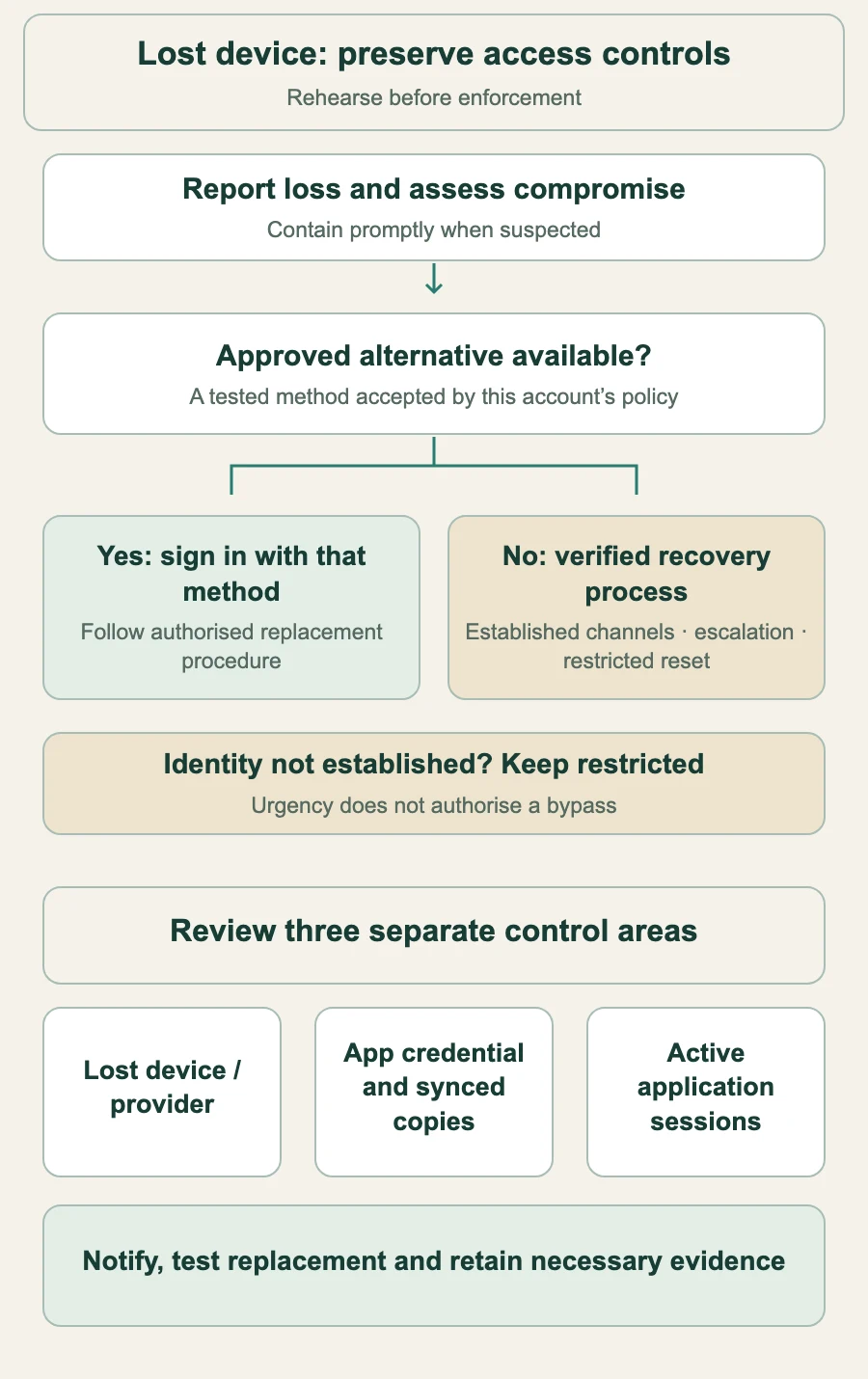
Start with a pre-enrolled alternative credential that the account’s policy accepts. Test it before an incident and store it separately from the device it backs up. If an approved method remains available, use that method to sign in and follow the documented replacement procedure; do not hand an unauthenticated caller a new credential.
If none remains, use a defined recovery process appropriate to the account’s risk. NIST’s account-recovery guidance distinguishes recovery methods and requires notification. A familiar voice, manager message or video call alone is not reliable proof against impersonation.
If saved recovery codes are supported, keep them securely offline and separate from the primary device. Test their permitted use and replacement; never treat a used code as permanent backup access.
Give the help desk a documented verification route using previously established information and channels, clear escalation and restricted reset powers. Protect enrolment of the replacement credential, notify through established channels and review the event. Use additional approvals or temporary restrictions where the risk policy requires them; do not improvise a bypass because payroll is urgent.
Treat lost-device management, application credential revocation and session revocation as separate tasks. Removing a device from a cloud account is not automatically removing its business-app sessions. Revoking a synced credential at the application can disable all copies of that credential; deleting one device does not prove the others are invalid. Coordinate with the identity/provider administrator and test what each control actually revokes.
If compromise is suspected, contain access promptly under the incident procedure rather than waiting for a replacement. If identity cannot be established, keep the account restricted and escalate. Business continuity may use an already authorised alternate approver with the required separation of duties; it does not justify impersonating the locked-out user.
A control map, not a universal help-desk script. A missing phone, a revoked credential and a terminated session are different events.
At the shared counter, keep the person separate from the tablet
Use individual accounts on shared terminals and end the previous session at handover. Do not save a personal synced credential in a shared browser/provider profile where colleagues can exercise it. Check OS profiles, kiosk restrictions, automatic locking, peripheral support and whether personal phones or Bluetooth are allowed.
An approved hardware key or supported cross-device sign-in can help, but test the actual terminal/browser combination. A short cashier PIN used inside an existing POS session is not automatically a WebAuthn passkey or phishing-resistant MFA. Treat it according to its limited purpose and permissions, not as an equivalent high-assurance login.
Contractors need their own scoped accounts, an end date and revocation of access/sessions at offboarding. The same applies when staff change roles. Do not rely on taking back a physical key while the application account, sync provider or active session still grants access.
Pilot a complete policy, not just a registration screen
Inventory supported browsers, devices, identity providers, recovery channels and accessibility needs. List every route that can bypass the proposed requirement: password, email link, TOTP, SMS, help-desk reset, legacy client and persistent session. Enforce the required strength on the protected routes, not merely an enrolment reminder.
Start with a supported group and accountable owners; prioritise high-impact roles while ensuring administrators have tested backup access before enforcement. Test enrolment, normal login, lost device, lost backup, wrong-domain attempt, weak fallback, recovery impersonation, a stolen active-session response, shared-counter handover and contractor removal. Use approved test accounts and environments.
TOTP and email/SMS recovery may be part of a transitional policy, but they are not equally phishing-resistant substitutes. If a sensitive route accepts a weaker fallback with the same privileges, that route remains exposed to that method. Plan explicit limits, monitoring and retirement; do not promise a blanket security upgrade from enrolment alone.
For customers, offer a clear, accessible adoption journey and usable recovery. Avoid surprising them with an untested enrolment demand in checkout. Business requirements may differ; prove the full journey rather than imposing one rule for every account.
Measure use and remaining bypasses
In a teaching pilot of 40 staff, 32 enrolled gives 80% enrolment. If 18 of the same 40 can still enter the protected application by password alone, that is a separate 45% exposure measure. The groups may overlap. Neither number proves that the other accounts have no weaker route.
Track successful use of the required method, failures by device/browser, recovery completion and suspected misuse, lockouts, active fallback permissions and support effort. State the cohort and period. Do not apply consumer-service adoption benchmarks as a promise of your own login speed or help-desk savings.
Return to payroll morning: the useful result is evidence that an approved spare works, an impersonation attempt fails, sessions and credentials can be contained, and a legitimate unresolved case reaches an owner. Complete those checks before saying the rollout is ready. A passkey is a strong part of the access system; recovery and permissions must hold up with it.
Reviewed 5 November 2026. Anichur Rahaman is the creator of StoreConsole. The company and pilot figures are illustrative; verify the capabilities of your actual application and identity provider.



 Infrastructure & Scaling