SaaS, Custom or Self-Hosted? A Software Buying Guide Beyond the First Invoice
Compare software with a fair five-year cost model, tested workflows, operational ownership and an exit rehearsal. No automatic winner or arbitrary user limit.
Autor
Anichur Rahaman
há 3 meses8 min de leitura150 visualizações
Three proposals sit on the same desk. One offers a monthly subscription, one a custom build, and one a self-hosted licence. The first invoice makes one look cheapest; the unanswered question is who will fix a failed payroll run two years later. This is an illustrative buying scenario, not a customer case study.
The useful choice is not simply “rent, build or own”. Hosting, billing, implementation and intellectual-property rights are different decisions. A self-hosted product may still charge an annual subscription; a custom application may use paid services and third-party licences. Compare the actual terms and responsibilities.
This guide offers a balanced way to shortlist software for 2026: prove essential workflows, calculate the full cost over a chosen period and test how you would leave. StoreConsole sells a self-hosted product, so the commercial interest is explicit. The framework must still allow SaaS or a custom build to be the better fit.
Compare evidence at each gate. SaaS, custom and self-hosted are options, not predetermined winners.
The three models in plain words
Question
SaaS
Custom build
Self-hosted licence
What you buy
Access to a provider-operated service
Development and agreed rights/deliverables
A product licence and deployment rights
Who operates it
Provider tasks plus your configuration and access duties
You, a partner or managed services, as agreed
You or a partner; vendor support according to contract
What to verify
Usage terms, access, export and recovery
Scope, IP/licences, maintenance and handover
Licence limits, support, operations and exit
The cost that matters: five-year total cost of ownership
Total cost of ownership (TCO) includes implementation, migration, training, licences, hosting, integrations, support and internal work. Add change, recovery and exit costs when relevant. Five years is a comparison window here, not a rule about how long every system lasts. Use the same scope, service levels and accounting basis for all options.
A deliberately simple, comparable cost example
The following figures are deliberately invented currency units, not vendor quotes, market averages or StoreConsole prices. Each recurring allowance combines the relevant service costs and internal labour for the assumed scope. The simple base case holds usage and prices constant; taxes, financing, inflation and exceptional downtime are not included. Add those items to a real purchasing model.
SaaS base case: implementation 6,000; recurring allowance 1,000 per month.
Self-hosted base case: implementation 12,000; recurring allowance 900 per month.
Custom base case: implementation 45,000; recurring allowance 750 per month.
Illustrative cumulative cost
Year 1
Year 3
Year 5
SaaS
18,000
42,000
66,000
Self-hosted
22,800
44,400
66,000
Custom
54,000
72,000
90,000
For the base case, cumulative cost at year n = one-time implementation + 12 × n × monthly running cost. The two product options tie at year five because the assumptions were chosen to show a trade-off, not manufacture a winner.
Do not compare a managed subscription with a self-hosted server bill that excludes the operator’s time.
Do not compare a small custom pilot with a fully implemented suite. Make required workflows, support and recovery expectations equivalent.
Change one assumption and the ranking changes. For example, adding 300 units a month of operational support to the self-hosted option adds 18,000 over five years, making its total 84,000. A SaaS usage increase or a custom feature request could change another option. Model low, expected and high scenarios with actual written quotes, including the cost to migrate out.
Six factors that matter more than the price
1. Time to go live
SaaS can offer a quick start for a simple scope, but configuring access, migrating data and training people still take work. A mature self-hosted package may also start quickly. A custom pilot can be small while a complete replacement takes longer. Compare a tested readiness plan, not a promised number of days.
2. Cost at scale
Check each billing dimension: active users, sites, orders, storage, API calls, payment fees and support. SaaS is not always per-seat, and self-hosting is not always a flat licence. Custom software can still require paid components. Recalculate for your actual growth scenarios rather than using a 10- or 15-user buying rule.
3. Data ownership and residency
Separate access to data, the ability to export it and the rights stated in the contract. For location requirements, check the primary store, replicas, backups, logs and support access. Neither SaaS nor self-hosting automatically satisfies every obligation. A deployment you control still needs secure access and a tested recovery process.
4. Fit to unique processes
A custom build can address a genuine process gap, but “custom” does not guarantee a perfect fit. SaaS and self-hosted products may both offer APIs, configuration and extensions. Demonstrate your difficult workflow, document the unsupported parts and price the change and future maintenance. There is no universal 80/20 coverage ratio.
5. Operations burden
SaaS usually transfers more infrastructure work to a provider, but your team still owns access decisions, configuration, data quality and recovery expectations. Self-hosting requires a named operator for patching, monitoring, backups and incidents. A managed partner can take tasks, but responsibilities and response times must be written down. An update button is not proof that a restore or rollback works.
6. Exit cost and lock-in
Rehearse an exit before signing. Export a realistic sample with attachments, history, identifiers and relationships; try loading it elsewhere. Check export formats, API limits, encryption keys, licence expiry, ongoing access and support handover. A database you can query helps, but it is not by itself a complete migration plan. Custom work also needs clear source-code, documentation and handover terms.
A score needs evidence, and mandatory gates come first
For the options that pass mandatory requirements, weight the six factors to match your priorities. Use a 1–5 score only with a supporting pilot result or contract answer; calculate the weighted average as sum(weight × score) ÷ sum(weights). A high average must not hide a failed mandatory control. Record uncertainty explicitly. Your most useful pilot might be a partial refund, an offline shop sale or an export with attachments, not another polished dashboard demo.
When each model is the right answer
Choose SaaS when…
Your required workflows work in a pilot and the provider’s service and data terms meet your needs.
You prefer to buy infrastructure operation, with clear responsibilities for your team.
The full quote remains acceptable across usage and growth scenarios.
Choose a custom build when…
A valuable, necessary workflow remains unsupported by suitable products or extensions.
You can fund delivery, security, maintenance and a durable handover, not just version one.
Choose a self-hosted licence when…
The product meets the tested scope and the licence permits your intended use.
You need deployment control and have a funded, competent operator or managed partner.
Licensing, infrastructure, support, updates, recovery and export costs make sense together.
A hybrid can be sensible: buy standard capabilities, operate selected components with a partner and build only the differentiating workflow. Each boundary adds contracts, integration and recovery responsibilities. Choose it because the total arrangement is supportable, not because “hybrid” is automatically best.
Twelve questions to ask any vendor
What will this cost at our current headcount, and at three times that headcount?
Which features are in the base price, and which are paid add-ons?
How much can prices rise at renewal, and is that written in the contract?
Where exactly is our data stored, and who can access it?
How do we export all our data, including history and relationships, and in what format?
What happens to our data if we stop paying, or if you go out of business?
How are updates delivered, and can we roll back a bad one?
What is your backup policy, and when did you last test a restore?
How do you handle security: two-factor sign-in, roles, audit logs, encryption?
Can we extend the system without breaking future updates?
Is there a free trial on our own data, and a money-back period?
Can we speak to the people who will support us after the sale?
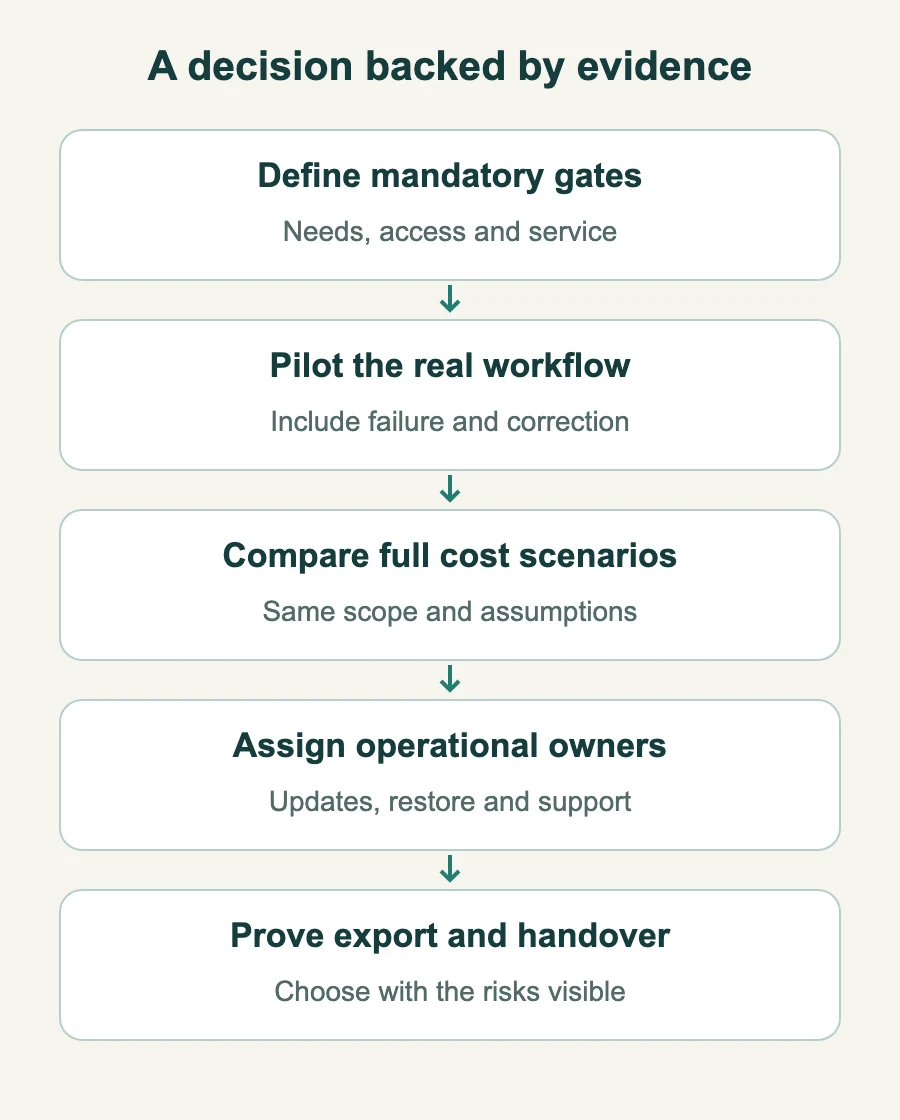
A five-minute decision path
List non-negotiable workflows, access limits, service and data requirements. An option that fails a mandatory gate cannot win through a cheap price.
Pilot the same difficult transaction in every shortlisted option, including its failure and correction.
Calculate comparable low, expected and high cost scenarios; record assumptions and exclusions.
Name who operates, patches, restores and supports each component, including during an incident.
Rehearse export and handover; choose the option whose evidence and risks your team accepts.
How StoreConsole is priced and delivered
StoreConsole offers a self-hosted, module-based licence per site rather than per user. Check the current pricing page, licence terms and supported deployment requirements for your configuration; the sample costs above are not our quotation. The published offer includes a 14-day trial and 30-day money-back policy, subject to its terms. Use the trial to validate your workflows, permissions, export and operational handover. The video below shows the plan and checkout journey.
How StoreConsole works (1:35): build a plan, check out with a free trial and get your licence key and download.
Key takeaways
Compare the complete service and workflow, not deployment labels or the first invoice.
There is no universal user-count threshold or automatically cheapest hosting model.
SaaS reduces some operational work; it does not remove your own responsibilities.
Customisation and self-hosting do not guarantee fit, ownership rights or compliance.
An affordable exit and a funded operator belong in the buying decision.
Sources and review
Reviewed 4 November 2026. Microsoft’s shared-responsibility guidance illustrates that customers retain data, identity and configuration duties in cloud services. Apply the actual responsibilities in your contract. The cost table, sensitivity and scoring method are editorial examples, not provider pricing or guaranteed savings.
Anichur Rahaman is a software architect and the creator of StoreConsole. He designs commerce and ERP systems for growing businesses, with a focus on event-driven architecture, data integrity and self-hosted operations.



 E-commerce