One self-hosted console to run your entire business — commerce, ERP, HRM, CRM & manufacturing
Technology · Self-hosted ERP

Built to run your whole business on your own server.Fast, secure, ready to grow.

Store Console is a modular monolith: a complete ERP with commerce built in, shipped as one application and one database that you install on infrastructure you own. This page shows how it is built, how it performs and how it keeps your data safe.

PHP 8.4 · Laravel 13 · React 19PostgreSQL 18 or MySQL 8.4Docker on any Linux serverA new release every week
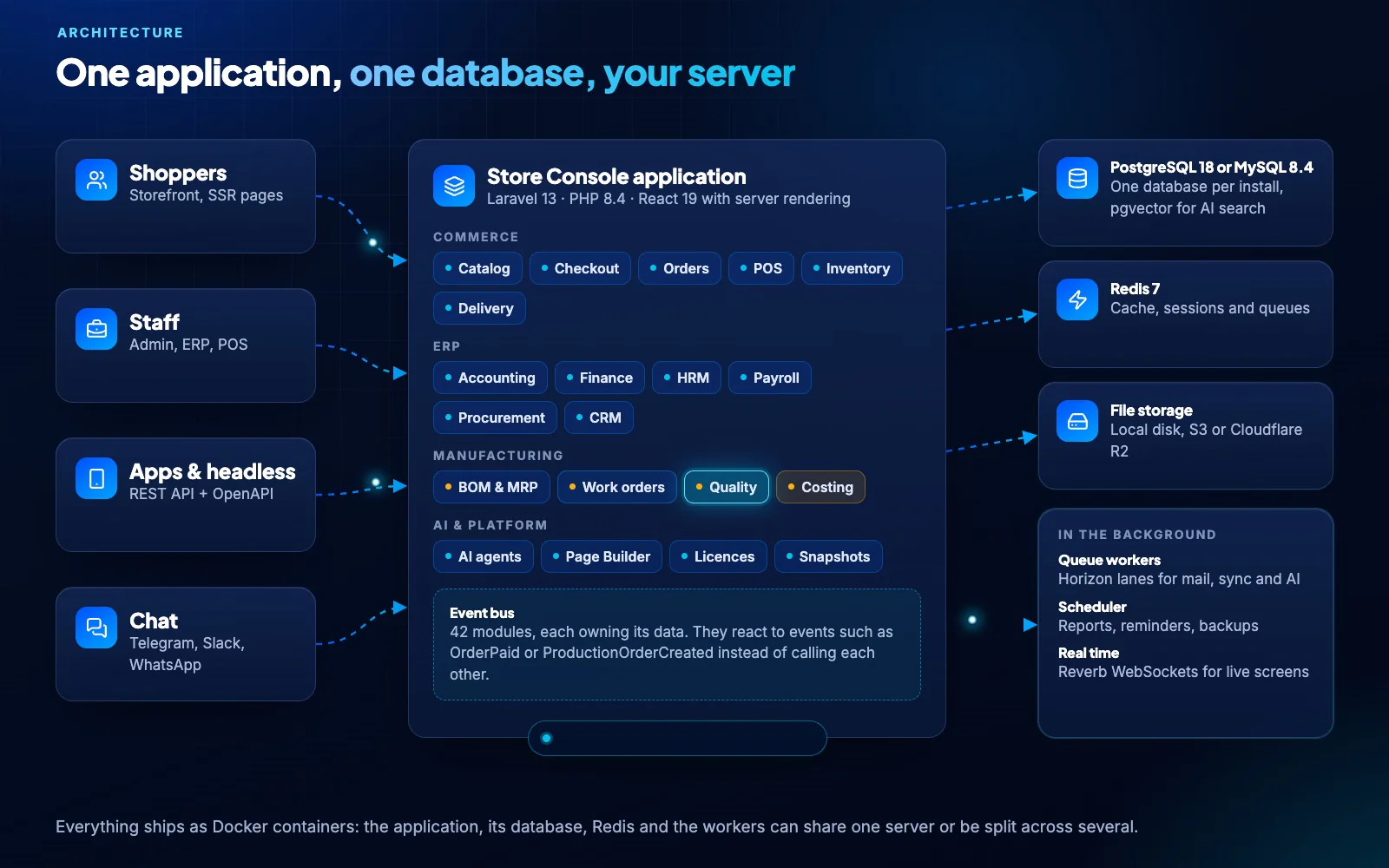
Animated architecture: requests from the storefront, staff, apps and chat flow into one application, modules react to events such as OrderPlaced and StockReserved, and data lands in one database
Live view: every request, every event, one database
83–89 msServer time per page, with no page cache
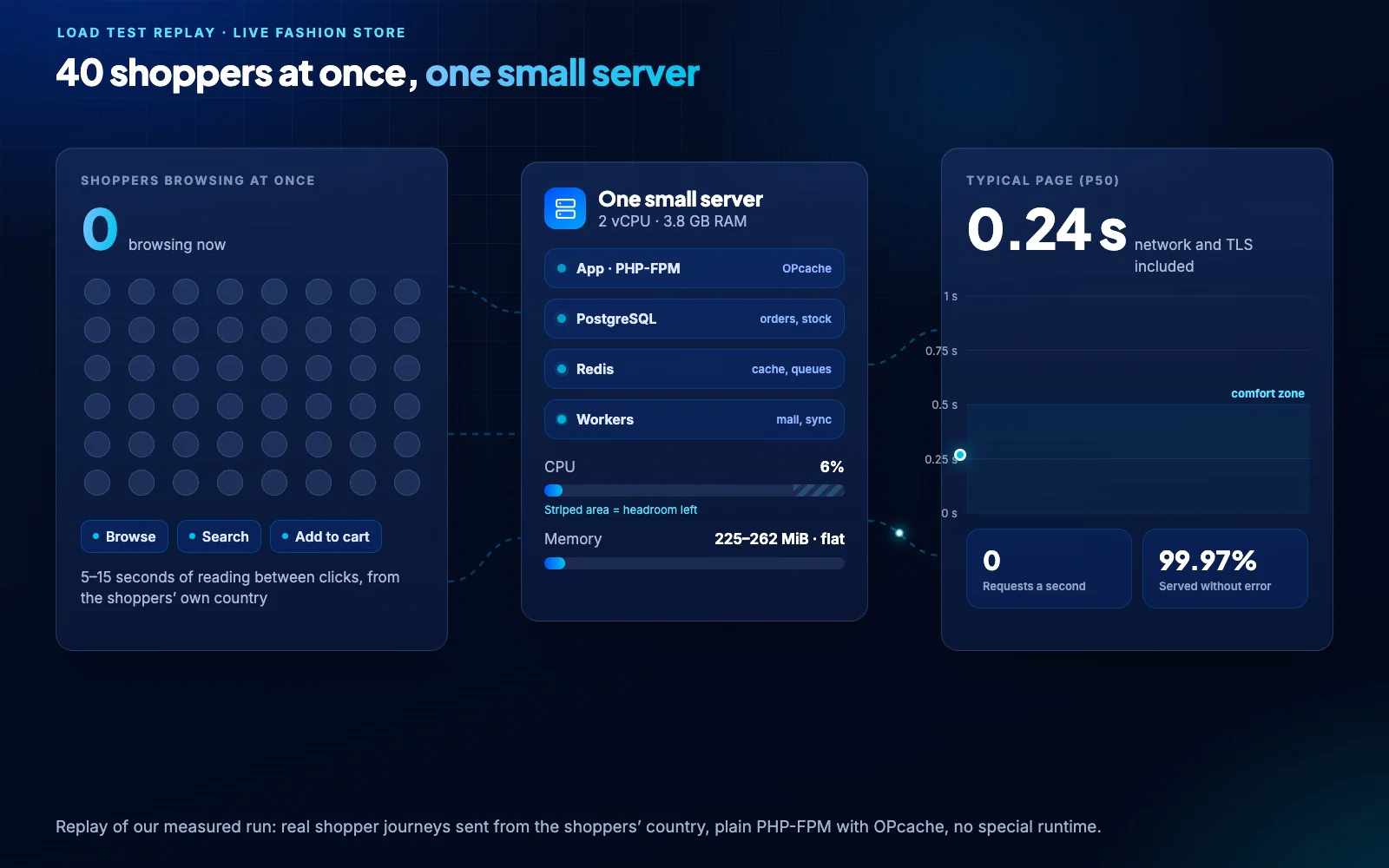
≈0.4 sTypical page with 40 shoppers at once on 2 vCPU
99.97%Requests served in our load test
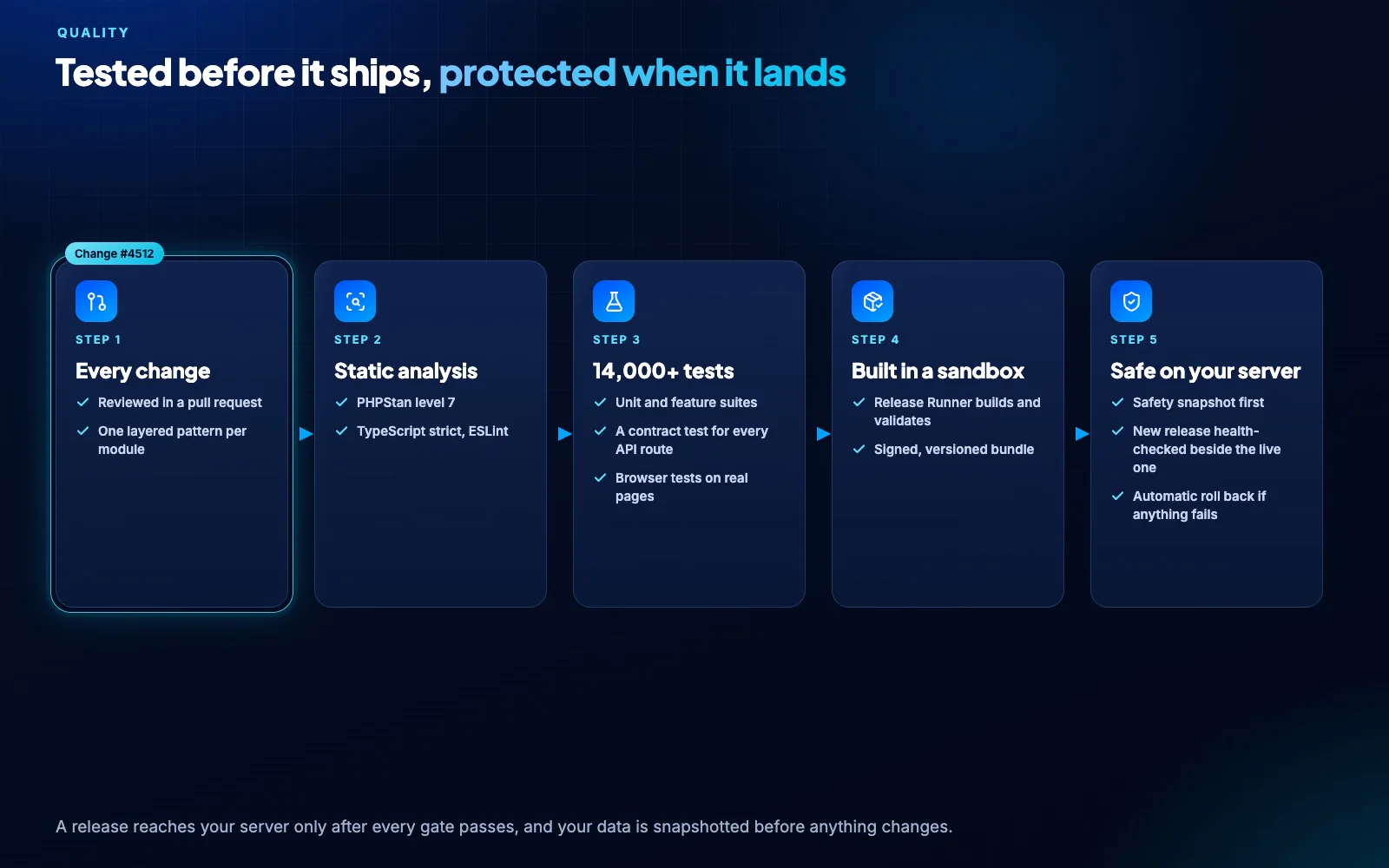
14,000+Automated tests behind every release
How it is built

One application with clear boundaries inside.

42 modules share one codebase, one database and one release, yet each owns its tables, rules and screens. They work together through events such as OrderPaid and StockReserved, so most changes stay inside one module.

Modular monolith

The reliability of one system, the separation of services.

There is no network hop between modules and nothing to keep in sync. Switch modules on as the business grows; the core never changes.

Own dataEach module owns its tables and migrations
Events, not callsOrderPaid or StockReserved connect modules
Permission per routeEvery screen and action checks a named permission
Lazy by designA module does no work a request does not need
ERP + manufacturing

From sales order to ledger in one transaction trail.

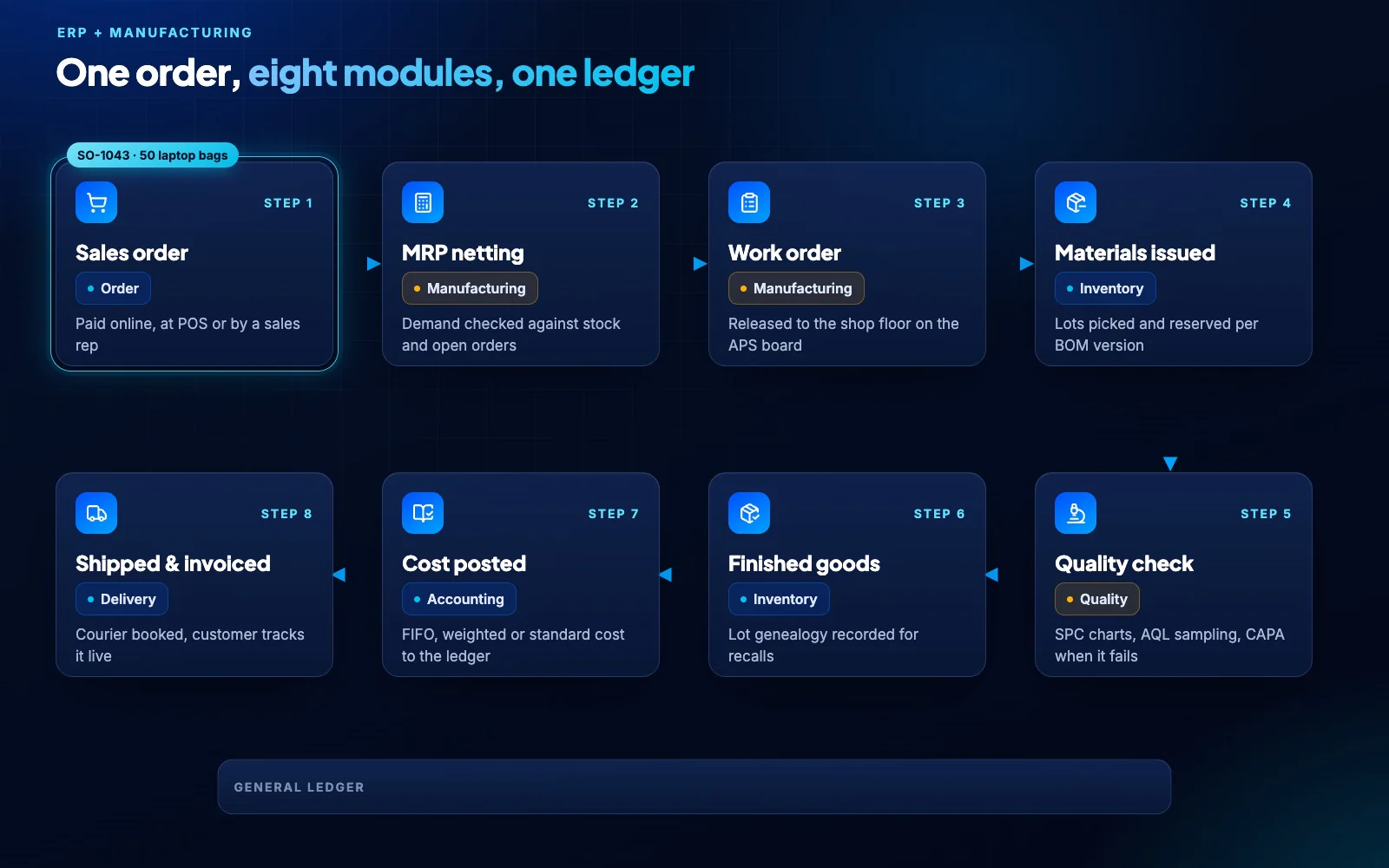
Manufacturing is where most ERPs split into separate products. Here the factory shares the same records as sales, stock and accounts, so planning, the shop floor, quality and costing always agree.

  • Multi-level BOMs with versions, phantoms and alternates
  • MRP netting and a drag-and-drop capacity board
  • Work orders, shifts, downtime, OEE and maintenance
  • SPC charts, AQL sampling, NCMR/CAPA and Gauge R&R
  • Lot genealogy, recalls, e-signatures and a tamper-evident audit chain
  • FIFO, weighted or standard cost posted to accounting
One sales order moves through MRP, work order, materials, quality, finished goods, costing and delivery, and the ledger stays balanced
Headless API + real time

One API for every storefront. Live updates everywhere.

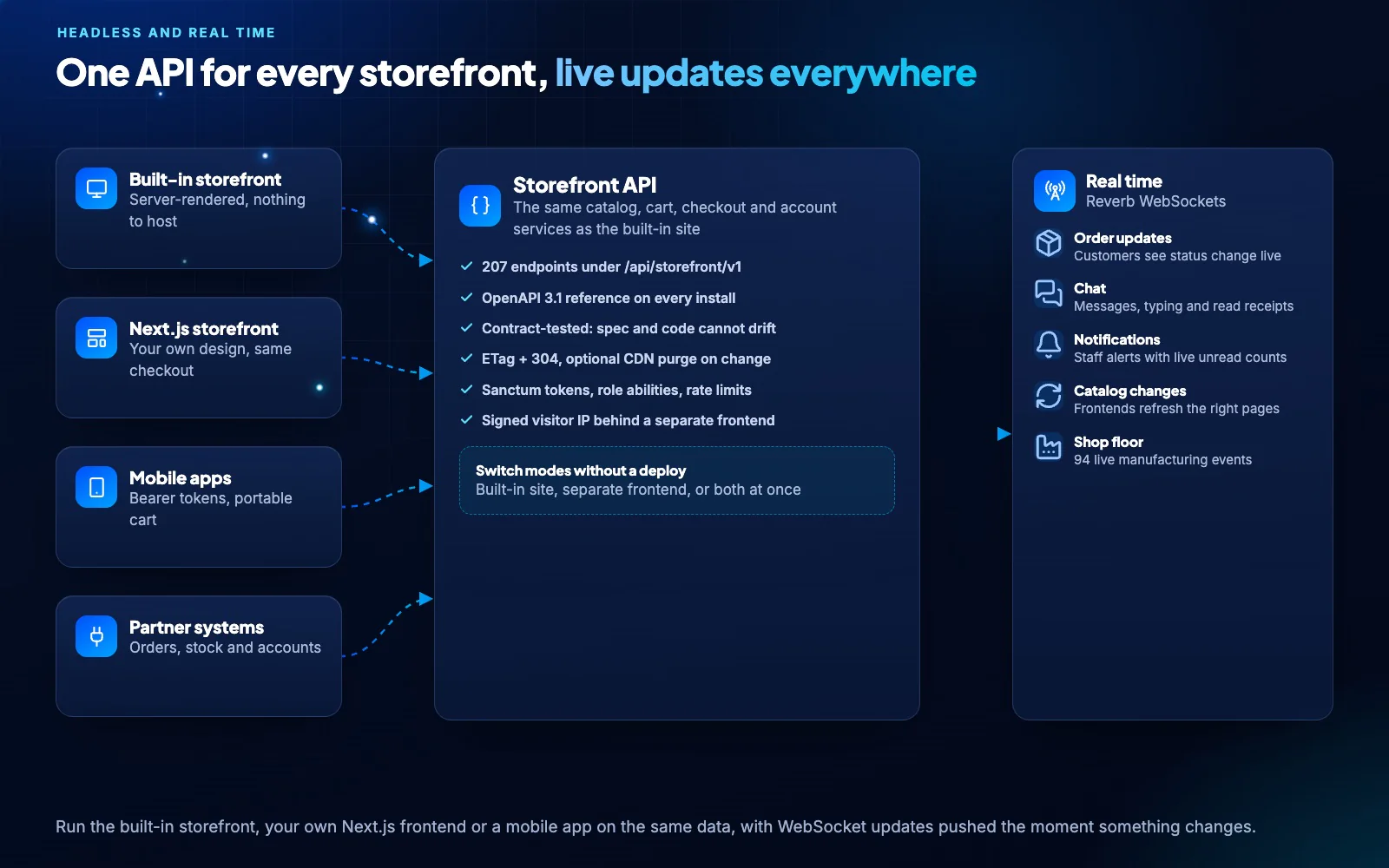
The built-in storefront, your own Next.js frontend and your mobile apps all use the same catalog, cart, checkout and account services. Reverb WebSockets push changes the moment they happen.

  • 207 endpoints under /api/storefront/v1 with an OpenAPI 3.1 reference on every install
  • Contract tests keep the reference and the code in step
  • ETag and 304 responses, and an optional CDN purge on every change
  • Customers see order status, chat replies and notifications live
  • Shop-floor boards update with 94 live manufacturing events
Requests flow from four kinds of storefront into one API, and live events are pushed back over WebSockets: order status, chat, alerts, catalog refreshes and shop-floor boards
Data

Every kind of data in the right place.

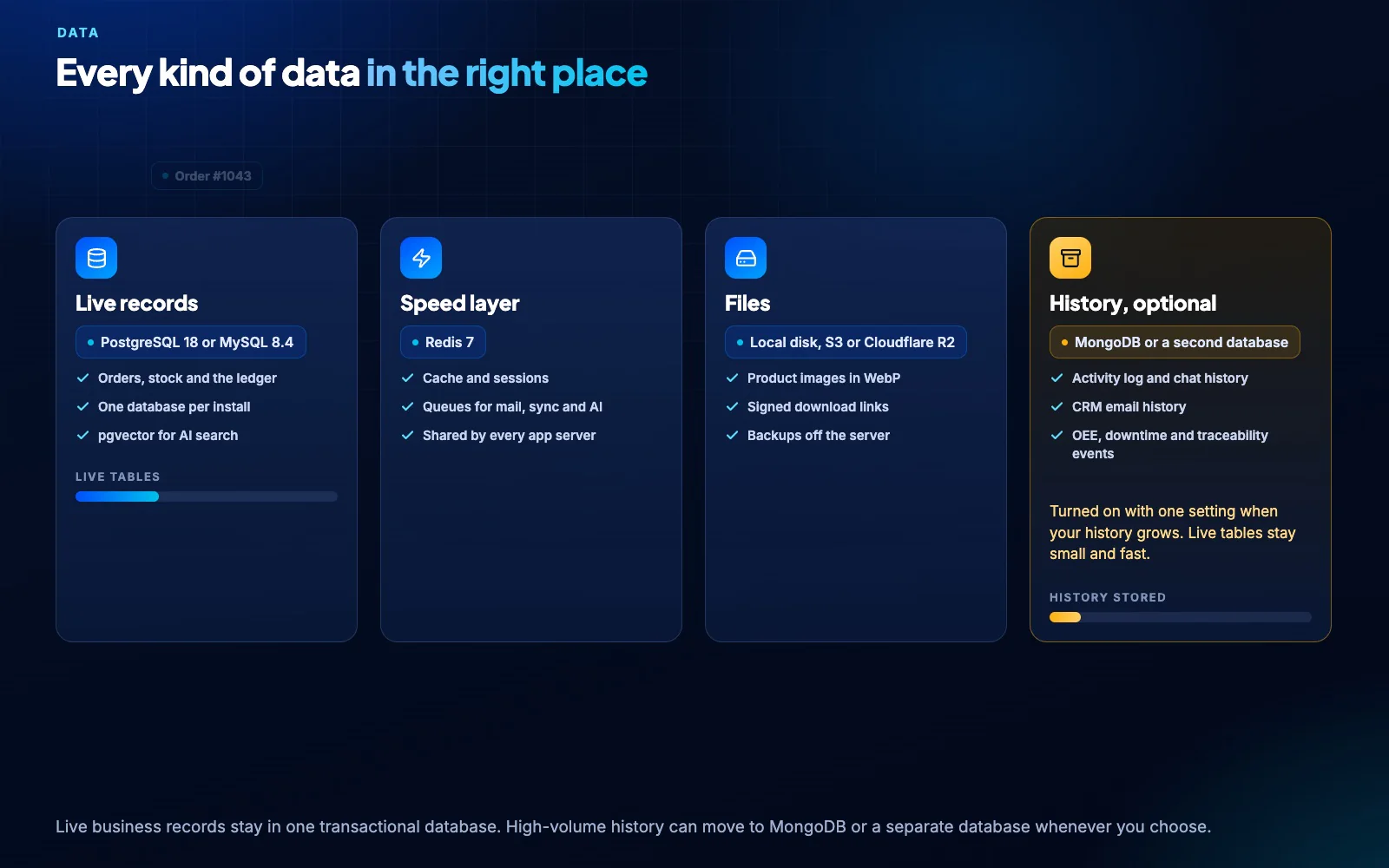
Live records stay in one transactional database. When years of history pile up, move the activity log, chat history, CRM email and shop-floor events to MongoDB or a second database with one setting, and keep the live tables small and fast.

Records land in the live database, cache and file storage, then years of history move to MongoDB with one setting while the live tables stay small
Performance

Fast because of how it is built, not how big the server is.

We load-tested a live store on a 2 vCPU server with real shopper journeys from the shoppers’ own country. A typical page took about 0.4 s with 40 shoppers at once, on plain PHP-FPM with no special runtime.

Replay of the load test: shoppers ramp up to 40 at once on a 2 vCPU server while the typical page stays near 0.4 s, CPU keeps headroom and memory stays flat
Scaling

Grow from one server without changing software.

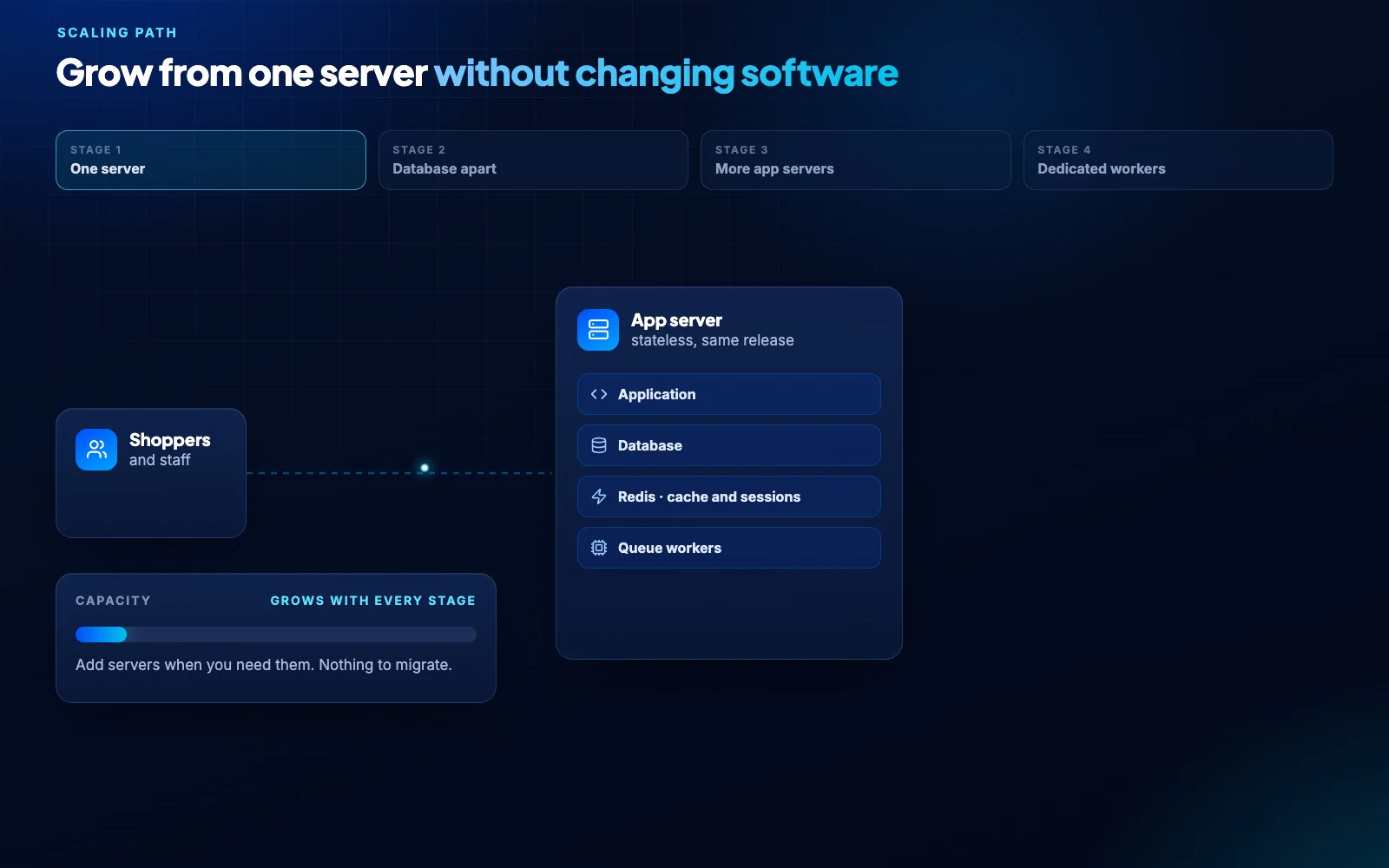
Start with everything on one machine. When the business grows, move the database, add app servers behind a load balancer and give background work its own nodes, all on the same release and data.

  • App servers keep no local state: sessions and cache live in Redis
  • Files on local disk, S3 or Cloudflare R2
  • Read replica and CDN for heavy reporting and traffic
One server grows in four stages: the database moves out, app servers multiply behind a load balancer and workers get their own nodes, on the same release and data
Security

Your data stays on your server, guarded in layers.

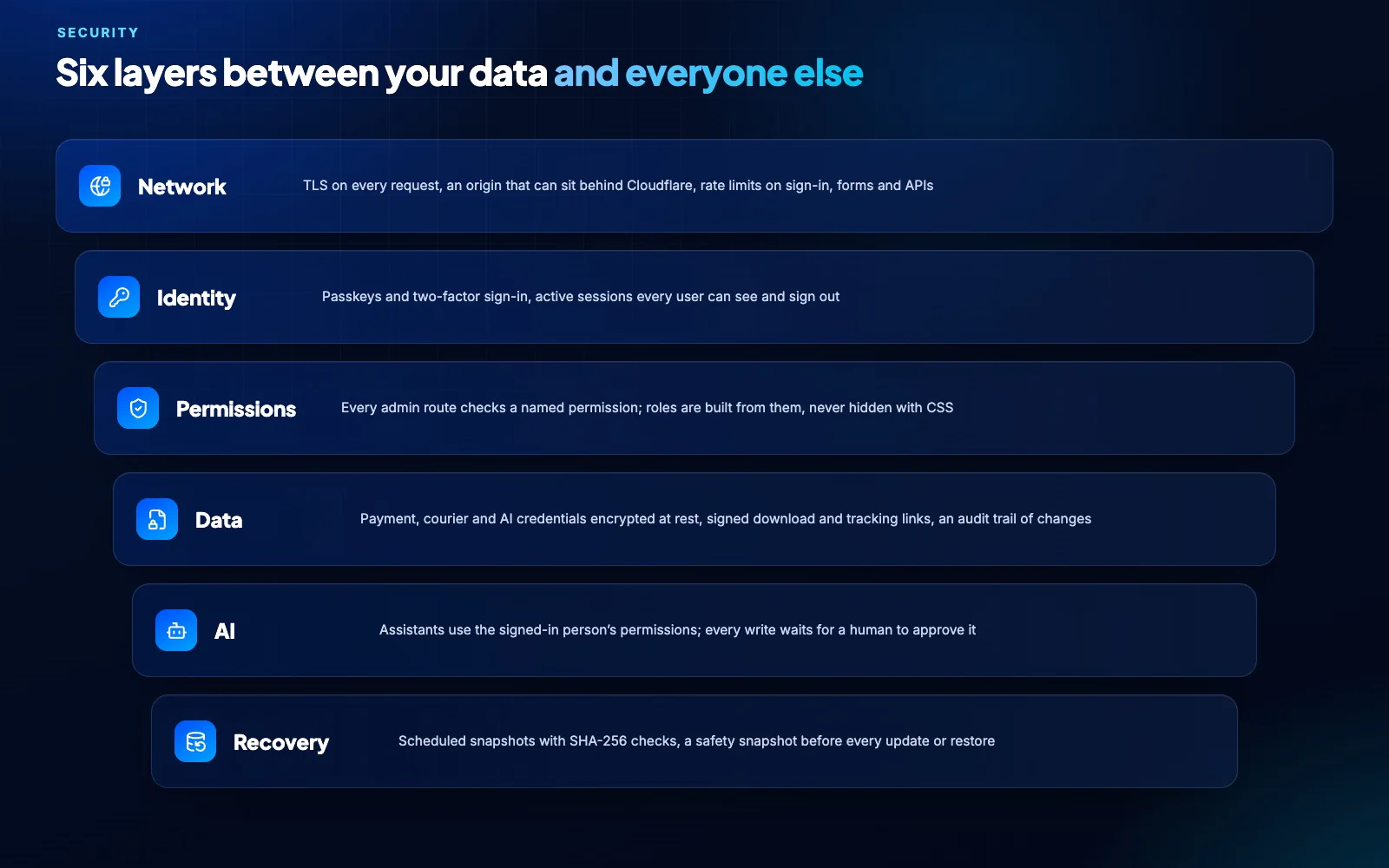
There is no shared cloud tenant to breach and no vendor copy of your records. Access is checked on every route, AI writes wait for a person, and recovery is built in.

A sign-in from an unknown device is blocked, then an approved request passes network, identity, permission, data, AI and recovery checks
Quality

Tested before it ships, protected when it lands.

Every change passes static analysis and more than 14,000 automated tests. Releases are built and validated in a sandbox, and your server takes a safety snapshot before anything changes.

A change passes five gates: review, static analysis, more than 14,000 tests, a signed sandbox build and a safe update on your server
One-click updates

Updates that protect the store while they install.

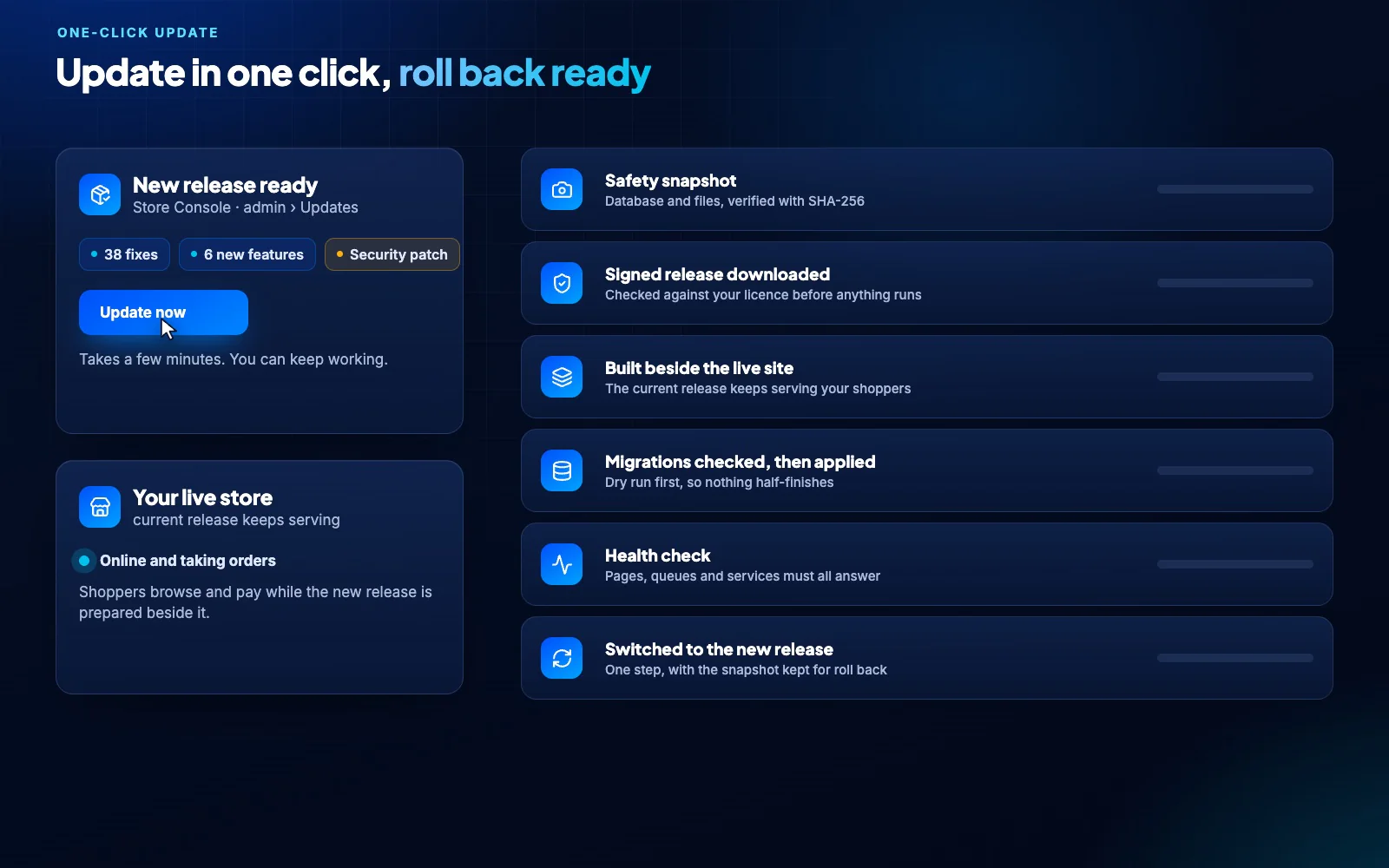
Click once in the admin panel. A snapshot is taken, the signed release is built and health-checked beside the live site, and it only goes live when every check passes.

A one-click update: safety snapshot, signed release, built beside the live site, migrations checked, health check and switch, with automatic roll back on failure
Releases

A better Store Console every week.

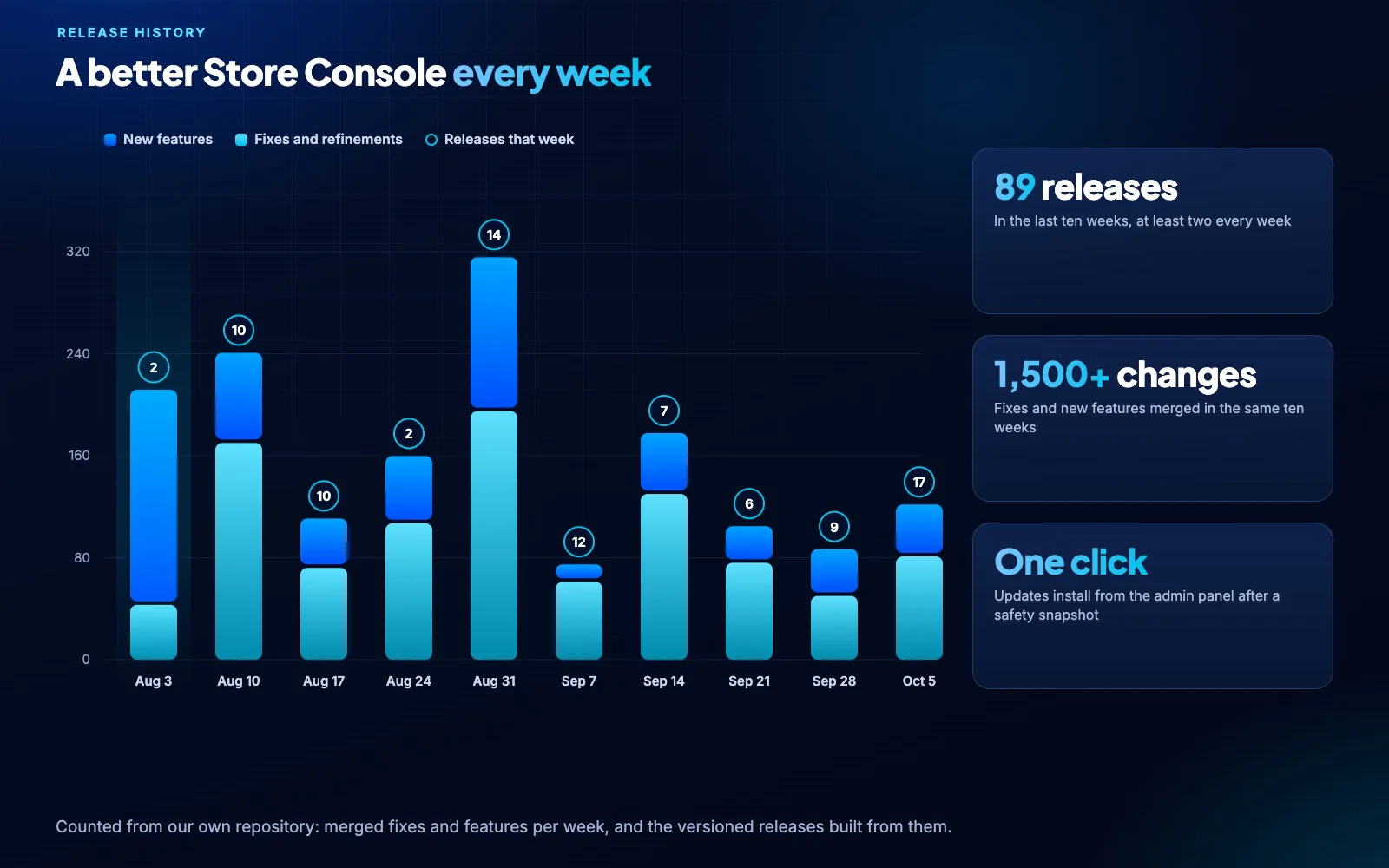
Fixes and new features ship in a new release every week, and every one of them installs from your admin panel with a safety snapshot first.

Releases per week over the last ten weeks: 89 releases carrying more than 1,500 fixes and new features
Technology stack

Proven, mainstream parts. Nothing exotic to maintain.

Any team that knows PHP and React can run, extend and audit it, and every piece is widely hosted and documented.

Application

PHP 8.4 and Laravel 13 in clear layers: controllers, services and repositories.

PHP 8.4Laravel 13

Interface

React 19 and TypeScript with Inertia server rendering and Tailwind CSS 4.

React 19SSR

Database

PostgreSQL 18 with pgvector, or MySQL 8.4. Optional MongoDB for long history.

PostgreSQLMySQLMongoDB

Cache and queues

Redis 7 for cache, sessions and queues, supervised by Horizon.

Redis 7Horizon

Real time

Reverb WebSockets push live orders, chat, notifications and shop-floor boards.

WebSockets

AI

OpenAI, Anthropic or a local model with your own keys, and semantic search on pgvector.

Your keys

Headless

A versioned REST API with an OpenAPI 3.1 reference, a Next.js storefront and mobile apps.

RESTOpenAPI

Deployment

Docker Compose on any 64-bit Linux, standard PHP-FPM, nginx with automatic TLS.

DockerPHP-FPM

Quality gates

PHPStan level 7 and more than 14,000 unit, feature, contract and browser tests.

PHPStan 7Playwright
Updates and support

Better every week, with people behind it.

Buying software you host yourself should not mean being left alone with it. Store Console keeps improving, and the team that builds it answers your questions.

A release every week

89 releases in the last ten weeks, carrying more than 1,500 fixes and new features.

One-click updates

Install from the admin panel. A safety snapshot comes first, and the new release is health-checked before it goes live.

Automatic roll back

If an update ever fails, Store Console restores the previous release and your data from the snapshot.

Help from the builders

Email [email protected] or open a ticket, and get a clear answer from the engineers who build it.

Your pace

Updates are never forced. Install when it suits you, and try them on a staging copy first.

Documented

Install guide, module guides and the API reference ship with every install and stay current.

Technical questions

What engineers ask before they install.

What server do I need to start?

For evaluation, 2 vCPU and 4 GB of RAM. For a live store with ERP, 4 vCPU and 8 GB. The requirements page has the full sizing guide.

PostgreSQL or MySQL?

Either. PostgreSQL 18 is recommended because pgvector powers AI search; MySQL 8.4 runs the same modules and migrations.

Do I need Octane, Swoole or FrankenPHP?

No. Our published numbers come from standard PHP-FPM with OPcache, so they hold on ordinary hosting with nothing special to run.

Can history move to MongoDB?

Yes. Set one connection and the activity log, chat history, CRM email and shop-floor events move to MongoDB or a second SQL database, while live records stay where they are.

How do updates work?

Updates install from the admin panel. A safety snapshot of the database and files is taken first, the new release is health-checked beside the live one, and it rolls back on its own if anything fails.

Does our data leave our server?

Only when you connect a service yourself, such as a payment gateway, courier, email provider or AI model, and each one receives only what its job needs. We hold no copy of your records.

Can we run several servers?

Yes. App servers keep no local state, so several can run behind a load balancer with Redis and shared file storage, and the database can move to its own server or a managed service.

Can our developers extend it?

Yes. Modules follow one layered pattern and talk through events, the REST API is documented with OpenAPI, and the storefront can be replaced with your own frontend.


See it run on your own server.

Start a 14-day trial, deploy with Docker and keep every record on infrastructure you control.