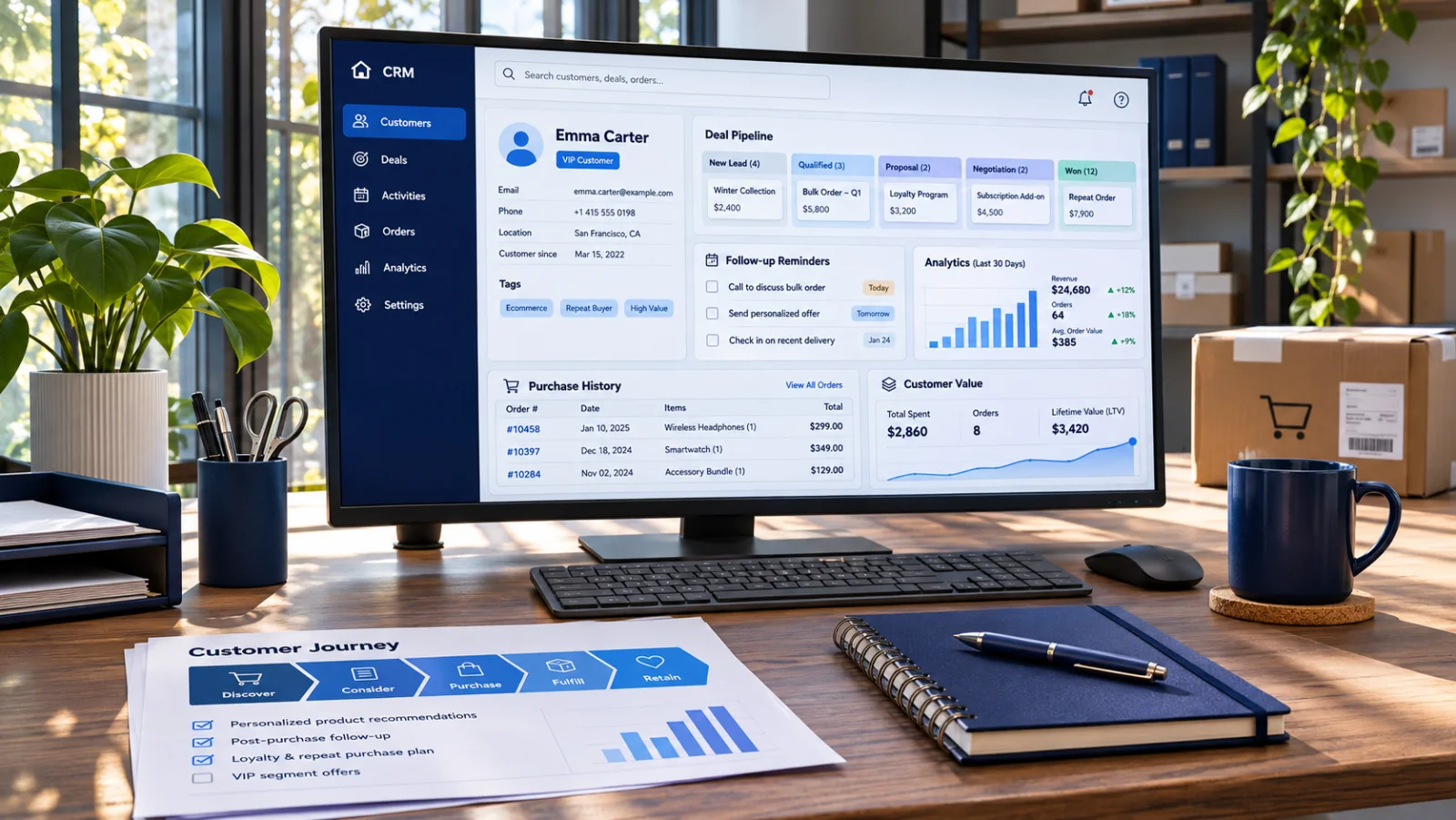
At 9:10 on Monday, a customer asks whether a popular bag is available in another colour. The question arrives in a social inbox. Before the store replies, a second message lands by email asking for a bulk price, and a teammate finds an old order under a slightly different spelling. None of these moments is unusual. The costly part is when each one stays in a different place.
An ecommerce CRM (customer relationship management system) gives the team a practical way to keep the relationship and its next step visible. It is not just an address book and it does not replace the storefront, order system or human judgement. Its value comes from connecting the conversation, sales work and customer context that already exist.
Start with one useful customer record
When a new enquiry arrives, the team can capture it as a lead with its source, contact details, owner and status. Leads can also come from imports or connected business events. Deduplication helps spot repeated contacts, while a timeline can bring together notes, tasks, messages, emails and changes to the record. When a store order creates customer context, the sales team can see a more useful history than a name in a spreadsheet.
That context changes the next question. Instead of asking a returning customer to repeat every detail, the team can check what they asked about, what was ordered and who last followed up. For a company buyer, an account can group its contacts and related deals; for an individual shopper, the focus can remain on the customer relationship.
Make the next action clear
A qualified wholesale enquiry may need a different path from a shopper asking about one order. Configurable pipelines and stages help the team move a deal from new enquiry through qualification and proposal to won or lost. Stage rules can require important details before a deal moves forward. A forecast and stale-deal checks help a manager notice work that needs attention; they are planning signals, not guaranteed revenue.
Tasks, reminders, notes and a shared activity timeline turn “I’ll follow up later” into an assigned next step. Lead and deal access can follow the team’s permission scope, so a sales representative works within the records they are allowed to see. A calendar projection can show relevant meetings and tasks when that integration is enabled.
Send messages that fit the relationship
When a store has consent and a valid reason to contact someone, rule-based segments can group leads by relevant attributes. A campaign can then send a useful follow-up, product update or offer to that audience. Email and, when configured, SMS campaigns can be planned in steps; quiet hours, suppression rules and sending limits help control delivery. Automation workflows can assign leads, create tasks, log activity, apply conditions or call a configured webhook. Publishing may require approval, depending on the store’s settings.
Segmentation is not permission to send unwanted messages. Keep consent, opt-out, channel rules and local marketing law in view. Start with a small audience and measure replies or purchases before expanding a campaign.
Use AI as a prompt, not a verdict
AI can suggest a lead or deal score with an explanation, summarize a customer record, find similar records, or recommend a next action. Those signals can help a busy team decide what to review first. They do not prove that a customer will buy, and they should not replace a person’s review of sensitive or unusual cases. Budget limits and the store’s AI settings also apply.
Make the customer journey feel connected
On Tuesday, the bag buyer comes back with a different question: can the store deliver before a family trip? The owner can see the earlier colour enquiry, the order status and the last follow-up in one customer history, then answer the actual question instead of starting over. If the customer later reports a damaged item, the support team can work from the same order context rather than asking for the story again. A CRM does not own stock, shipment or support policy; it helps the people responsible see the relationship around those records.
For a wholesale buyer, an account can keep several contacts and opportunities together. One person may ask for a sample, another may approve a quote, and a third may handle payment. Clear ownership, notes, tasks and stage history prevent a promising conversation from depending on one employee’s memory. When a deal is won or lost, the team can record why and improve the next conversation.
Learn from the pattern, then improve the process
Useful CRM reporting looks beyond the number of messages sent. A store can review lead sources, time spent in each sales stage, overdue follow-ups, reasons deals are lost and campaign responses. Compare those signals with service quality and repeat orders; a high open rate alone does not mean a campaign helped the customer. Start with a small segment, check that its rules match real customer needs, and make it easy for people to opt out. Shopify’s customer segmentation guide is a practical reference for rule-based groups and relevant communication.
The owner’s first improvement is modest: one shared customer record, a named follow-up owner, and a weekly review of stuck enquiries. Later, the store can connect sales conversations with order-aware customer support, ecommerce finance planning and project workflows. Each team keeps its own source records; the customer experience becomes easier to coordinate.
A low-friction way to begin
- Choose one sales flow, such as new product enquiries or wholesale orders.
- Agree on a small set of stages and what information each stage needs.
- Assign an owner and a follow-up task for every qualified lead.
- Use one modest segment and one useful campaign, then review the outcome.
- Expand automation only after the team trusts the underlying customer data.
The right ecommerce CRM software makes it easier to remember a customer and act on what the team already knows. It cannot create trust by itself. Clear records, thoughtful follow-ups and permission-respecting communication do that. As a store grows, CRM can connect those habits to a wider ERP workflow—one step at a time.
Common questions
What does an ecommerce CRM do?
It helps teams organize leads, contacts, accounts, sales opportunities and customer interactions, often alongside relevant order context and follow-up tasks.
Is a CRM only for large stores?
No. A small store can start with lead tracking and follow-up tasks, then add segments, campaigns or automation when the process is ready.
Does CRM automation guarantee more sales?
No. It can make follow-up more consistent, but results depend on product fit, service, consent, message quality and execution.
Store Console is modular. CRM features depend on installed modules, permissions, plan, connected channels and settings. See the product features and the CRM guide for setup details.